 Unicorns Can Talk
Talk. It types.
Say it out loud and your unicorn types it, right here on your own computer. Dictate letters, notes and documents into any program, with spoken punctuation, voice commands and a little floating unicorn that listens when you ask it to.
Inspired by another now-defunct app also named after a mythical creature...
Version 0.1.1 · free · BSD 3-Clause License · all downloads
- Works offline
- Windows & macOS
- No account
- Open source

What it does
Private by design
Speech is recognised on your own computer. No account, no cloud, nothing sent anywhere. It even works with the internet switched off.
Speak, and it types
Into Word, your email, a browser, anything with a cursor. Words appear as you speak, with punctuation you say aloud: “comma”, “full stop”, “new paragraph”.
Voice commands
“Scratch that”, “correct hearing date”, “select all”, “bold that”, “go to end of document”, and your own commands and text blocks.
Superpowers in Word
On Windows: headings, lists, tables, find and replace by voice, and an optional local proofreader that shows its edits as tracked changes.
Transcribe recordings
Turn a meeting or a voice note of up to two hours into a Markdown file or a Word document.
Make it yours
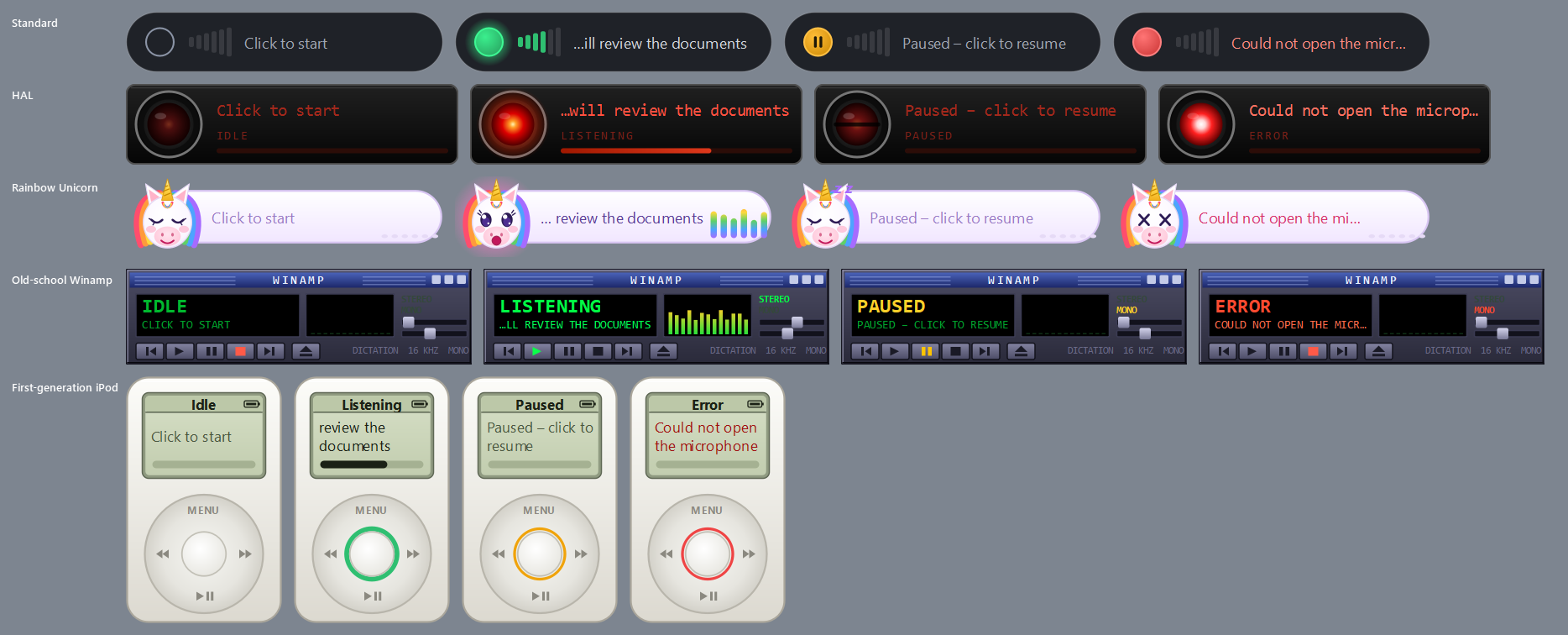
A tiny floating widget that never steals your cursor, five skins (a unicorn, HAL, Winamp, an iPod…), wake words, and every setting in one window.
How it feels
A small widget floats on your screen. Click it (or say “start dictation”) and talk: the words are typed wherever your cursor is, as you speak. Say “comma” or “new paragraph” where you want them. Made a mistake? Say “scratch that”. Click again to pause.
The first time it starts, it asks two quick questions, checks which speech model suits your computer (it can listen to you read six sentences to be sure) and downloads it once. After that it needs no internet at all.
Download
| Kind | File | Size | Needs | |
|---|---|---|---|---|
| Windows | Installer | UnicornsCanTalkSetup-0.1.1.exe | 93 MB | Windows 10 or 11, 64-bit. Installs for you only; no administrator needed. |
| Windows | Portable zip | UnicornsCanTalk-0.1.1-windows-portable.zip | 140 MB | Unzip anywhere and run UnicornsCanTalk.exe. Nothing is installed. |
| macOS | Disk image | UnicornsCanTalk-0.1.1-macos-arm64.dmg | 110 MB | macOS 12 or later on Apple Silicon (M1 and newer). Drag it to Applications. |
The speech model (about 660 MB for the recommended one) is downloaded on first start, not included in these files. Older versions and release notes.
Licence
Unicorns Can Talk is free and open source under the BSD 3-Clause License. In plain words: you may use it, copy it, change it and share it, at home or at work, for free. If you share it, keep the copyright notice and the licence with it, and don't use the author's name to promote what you made from it. It comes with no warranty.
The program uses other people's libraries, and downloads speech and language models, which keep their own licences. One to know about: the recommended proofreading model (Qwen2.5 3B) is for non-commercial use; Settings shows each model's licence where you choose it.